Classic FFXI Foundation
Titan preserves the core feel and progression of classic level 75-era FFXI. Combat balance, equipment hierarchy, job identity, dangerous enemies, meaningful travel, and earned rewards remain central to the game.
Base EXP, crafting, skill-gain and ordinary drop multipliers are 1.0x. The starting Rhapsody in White and Rhapsody in Crimson key items separately add +200% to combat and magic skill-up amounts (3x base), subject to the existing cap; they do not increase EXP or crafting skill-ups. Titan also has party EXP rules, reward systems and full red-proc currency rates in Dynamis. Custom Brown and Blue Caskets, Recruits and the Mercantile Guild are Titan additions; post-75 equipment and item-level gear are excluded from Titan’s approved rewards and Auction House. Titan's quality-of-life changes are designed to support the original adventure, not replace it.
Meet Recruits in the World
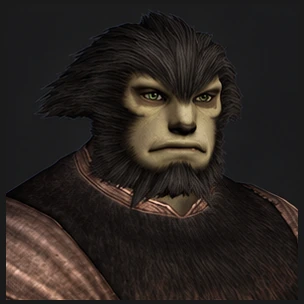
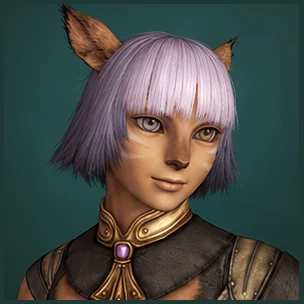
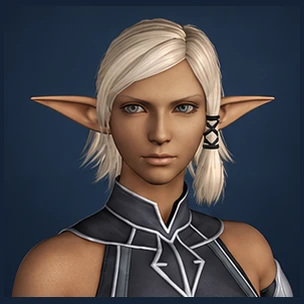
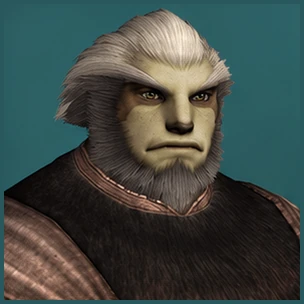
At active recruitment anchors, three adventurers are looking for a party. Each is drawn independently from all 24 profiles across 22 jobs, so an anchor can offer duplicate jobs or roles. Each brings a name, playable-race appearance, and classic job look of their own.
Everyone sees the same available Recruits. When one joins your party, that spot is open for someone new. A new Vana'diel day brings a fresh cast of adventurers, even while earlier Recruits remain with their parties.
After death or dismissal, a Recruit has a three-minute real-time return delay and waits for their original spot to be free.
A Party That Travels With You
Recruits fill open places in your six-member party. You can join an alliance and keep them with you, while party and alliance size do not reduce EXP.
Eligible battlefields, instances, and Dynamis encounters can fill open places with freshly generated Recruits. Fills look for missing tank and support roles before adding damage dealers. Encounter and party limits still apply.
They also listen when you use FFXI's TAB phrases in party or alliance chat. Ask for a Cure, Sneak, or Raise, name the person who needs it, or simply greet the crew. A Recruit answers in chat and can tell you when a spell is still recharging, MP is low, or the effect is already active.
Teleport Crystals
Teleport Crystals are enabled throughout the world, but they must first be unlocked normally by discovering and touching them.
Once unlocked, they provide faster travel using gil. This makes movement across Vana'diel more reasonable without removing the need to explore first.
Survival Guides
Survival Guides are enabled throughout the world and must first be unlocked by discovering and interacting with them.
Once unlocked, they can be used for fast travel with Tabs, the same currency earned through Fields of Valor and Grounds of Valor. Travel becomes more convenient, but discovery still matters.
Fields & Grounds of Valor Camps
Field Manuals and Grounds Tomes give adventurers repeatable page objectives alongside normal monster EXP. Each repeat raises the page EXP by 4%, up to twice its original reward. Partial page progress and accumulated repeats survive logout and server restarts when you return to the same zone. Changing zones resets that progress; changing jobs resets the repeat EXP bonus. Monster EXP chains still follow the familiar rewards through Chain 5, which pays 1.50x; longer chains in book zones do not raise that bonus further.
FoV and GoV keep their own page objectives and rewards. Neither grants Prowess. Choose a book camp when you want steady page completions as well as the hunt itself.
EXP Chains Beyond the Books
Areas without a Field Manual or Grounds Tome reward parties that can keep a long EXP chain alive. Chain 6 pays 1.60x monster EXP, climbing through Chain 7 at 1.80x, Chain 8 at 2.10x and Chain 9 at 2.45x. Chain 10 and every later chain pay the 2.80x maximum, while the displayed chain count keeps rising.
These camps offer no page rewards or flat EXP bonus. Caedarva Mire is one example; bookless camps in CoP, ToAU and WotG follow the same rule. A practiced party can make a familiar merit camp rewarding by sustaining its chain.
Blue and Brown Treasure Caskets
Each eligible EXP-yielding monster in a casket-enabled area has a flat 10% total chance to leave a Treasure Casket, split equally between Blue and Brown (5% each). Enemy level does not scale this drop chance. Books, chains and Prowess add no bonus. Monster level still shapes the contents.
Brown Caskets offer each eligible human party or alliance member a separate roll for unaugmented, Auction House eligible equipment suited to the monster's level, including +1 gear. Blue Caskets give each eligible human one to three independent crafting supplies plus the full gil reward based on the source monster: 250 gil at level 1 and 12,000 at level 75. Gil is not divided among the group, and companions receive none.
The Mercantile Guild at Work
When adventurers sell eligible finds to shopkeepers, the Mercantile Guild takes those goods into its care and offers them on the Auction House. The merchants can gather loose materials into stacks or turn accounted supplies into equipment, food and other useful wares. They may also buy needed ingredients from adventurers' Auction House listings at fair asking prices, or find ordinary supplies at shops when a craft calls for them.
What the Guild paid for each ingredient follows it into the finished item, with the Guild's usual twenty-percent margin added when it reaches the market. Mogabelle also watches for player listings priced below what ordinary shops would pay. The Guild's shelves grow from what players find, sell and trade; meet the merchants to see who tends each trade.
Party Level Sync and Area Caps
Party Level Sync is disabled on Titan. Original CoP area and battlefield level caps still apply where appropriate.
Titan keeps party sync disabled to encourage movement between camps as characters level, with more reasons to explore the world.
Players are encouraged to explore different zones, move through natural level ranges, discover travel routes, and use the many available camp options across Vana'diel.
One Character Per Account
Each account is limited to one character. This keeps progression focused, encourages meaningful job development, and prevents players from bypassing progression or resource limitations through excessive alternate characters.
No Dual Boxing
Titan is designed around one actively controlled character per player. Dual boxing is not permitted.
Only one character may be connected per IP address at a time by default. Legitimate households may request an exception for multiple real players sharing the same internet connection.
Level 75 Progression, Titan EXP Rules
Titan uses level 75 progression with custom EXP rules. Monster-kill EXP remains full through six nearby group members, then scales by 6 divided by group size. Players, Recruits and Companions count; ordinary job pets do not. Level differences and monster difficulty still affect rewards. Valor pages and extended chains in bookless camps provide additional ways to progress.
EXP and skill gains use 1.0x base rates. Every character keeps Rhapsody in White and Rhapsody in Crimson for more affordable travel. Their EXP bonuses remain disabled. White and Crimson each add +100% to combat and magic skill-up amounts, for +200% combined (3x the base amount) before the existing cap. This increases the amount gained on a successful skill-up, not the chance of one occurring. Normal EXP rings, chains and other eligible modifiers still apply.
Solo-Friendly Battlefields
Mission, quest, BCNM, and other eligible instanced battlefields may be entered without traditional minimum party-size requirements.
Where ally support is allowed, use the manual Recruit call while your party is safe. Eligibility, encounter mechanics and progression requirements still apply, alongside Titan's custom combat and reward rules.
More Time Adventuring
Titan may reduce excessive time gates, unnecessary waiting, and mechanics whose primary purpose is making players stand around instead of playing.
Recruits, job bonuses and custom rewards change how encounters play. Titan aims to keep preparation, equipment and progression meaningful while giving players more time to adventure.
Level 75 Equipment & Progression
Titan builds its equipment progression around the level 75 cap. Post-75 and item-level gear are unavailable; rewards and conveniences support Titan's own progression rules.
Equipment still has to be earned. Exploration, encounters, crafting and trading remain part of building your character.
Job-Friendly Storage
Expanded storage options are available to support players leveling multiple jobs on one character.
The TitanHub inventory meter counts occupied slots across Inventory, eight Wardrobes, Satchel, Sack and Case, excluding Safe, Safe 2, Storage and Locker. !sort organizes those managed bags, merges stacks and restores equipped gear. !optimize searches Wardrobes for a balanced usable set for your current main job.




 Moon: Pending
 RSE: Pending
 Ferry: Pending
 Server: Checking




 0 Bastok
 0 Windurst
 0 San d'Oria
 Crystal Bass ×1
 Adaman Ore ×1
 Rusty Dagger ×3
 Yagudo Drink ×1